aria2c · yt-dlp · wget, under one keyboard
A download manager that lives in your terminal
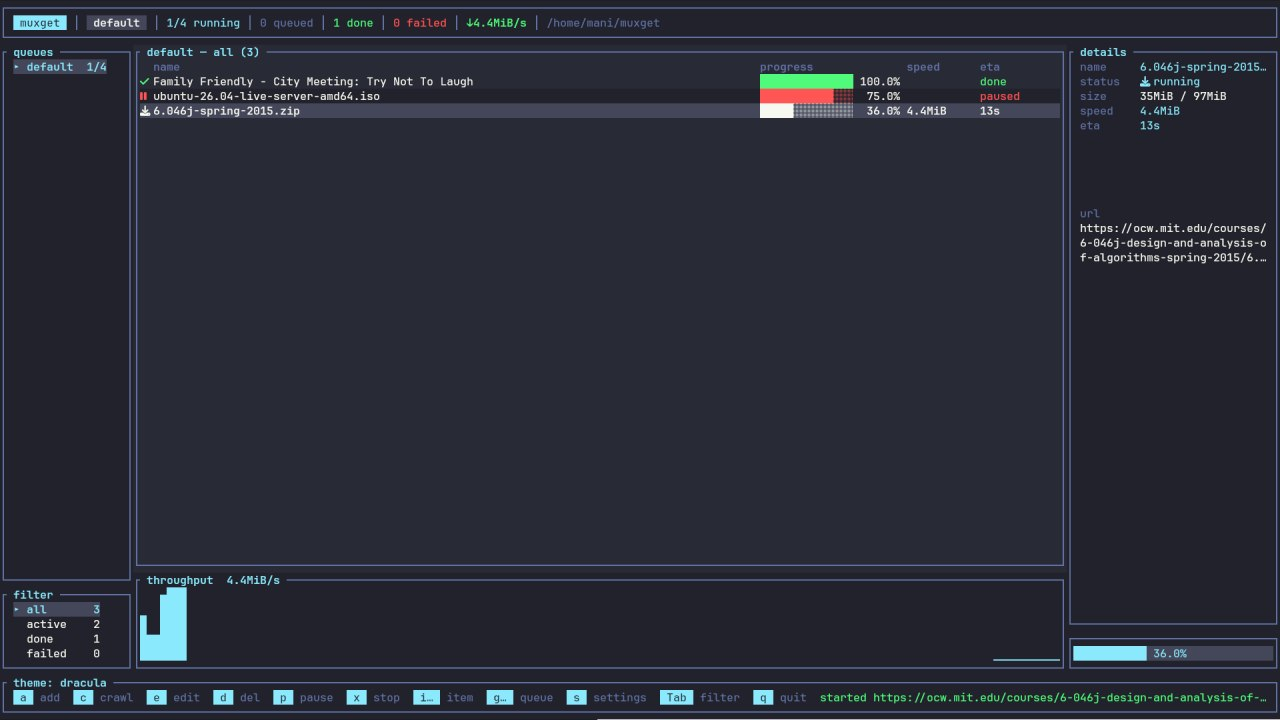
Paste a link. muxget picks the right engine, queues it, and shows you live progress. Files, torrents and magnets go to aria2c, videos and playlists to yt-dlp, whole websites to wget. One list, one set of keys, everything at once.
Install muxget Read the manual MIT licensed · Linux, macOS, Windows
What it does
Anything with a link
Direct files, FTP, .torrent files, magnet links, videos, playlists, whole
channels, entire websites. The url decides the engine, or a rule of yours does.
Queues with their own slots
Each queue runs its own number of downloads at once, so a busy lane never blocks another one. Order is priority, and you can promote a row with one key.
It resumes
Close the app mid-download and the next launch picks up from the partial file. Paused rows come back paused, and retries already spent stay spent.
Schedules and quotas
Run a queue only between 22:00 and 06:00 on weekdays, cap it at 150MB per four hours, retry failures three times, shut the machine down when it drains.
Routes itself
A rule can send every .iso to one queue and folder, and every YouTube channel
to a folder named after the channel, with captures doing the naming.
Crawls websites
Point it at a page and get back every PDF it links to, or mirror the whole site for reading offline and keep that copy current on a schedule.
Why a terminal download manager
A browser gives you one download at a time. No queue, no schedule, no retry, and
no way to say "these thirty links, four at a time, tonight, capped at 2MB/s".
Command line tools do all of that but leave you to remember the flags. muxget
sits in between: the power of aria2c and yt-dlp, with a screen that shows
you what is happening and keys that do the fiddly parts.
It runs over SSH, so the download manager on your home server or seedbox is the same one you use locally.
Get it running in a minute
# Arch
sudo pacman -S aria2 yt-dlp wget
cargo install --path .

# Debian or Ubuntu
sudo apt install aria2 yt-dlp wget
cargo install --path .
Prebuilt .deb, .rpm, AppImage, MSI and tarballs are on the
releases page. Full steps are on
the install page.
Where to go next
| page | what is on it |
|---|---|
| Install | packages, requirements, command line flags |
| Getting started | the screen, moving around, the basics |
| Downloading | the add form, playlists, clipboard, credentials |
| Channel sync | keeping up with a channel you follow |
| Queues and schedules | slots, time windows, quotas, retries |
| Crawling websites | link discovery and offline mirrors |
| Routing rules | sending downloads to queues and folders by rule |
| Settings | backend flags, video quality, the log |
| Themes | six built in, and the eight colours behind them |
| Files on disk | where your state, rules and themes live |
| How it works | what happens underneath |
| Troubleshooting | when something does not download |
| Keyboard shortcuts | every key, in one table |
muxget is MIT licensed and the source is on GitHub.